 Angular Data Grid Documentation
Quick Start
The NgxDeebodata or NgxDeebodataCommunity Data Grids can be installed via NPM.
Obtain a deployment license here for any NgxDeebodata usage beyond localhost:4200, where you can get the full functionality for free during local development.
Add the Angular Data Grid to Your Project
Find the component in your project where you want to add the data grid. In that component's .ts (TypeScript) file, import the NgxDeebodata at the top of the file with other imports.
import { NgxDeebodata } from 'ngx-deebodata';You need to add the standalone component to the imports array of the file where you just imported the data grid:
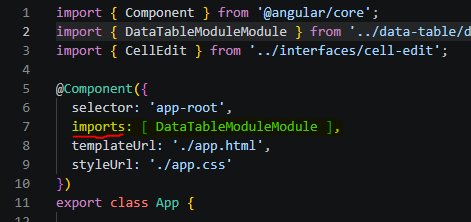
Now, find the corresponding template (html) for the component where you imported the module, and place the html code below where you want the grid to appear. The code is for the selector of the main data grid component.:
Community
<ngx-deebodata-community

    [editable]="true"

    [rowNumbers]="true"

    [data]="data"

    [color1]="'#000035'"

    [color2]="'#e9e9e9'"

    [primaryKey]="'employee_id'"

    [defRowHgt]="'100px'"

    [defGridHgt]="500"

    [altRowColor]="'#ececec'"

    [myColumnSymbols]="symbols"

></ngx-deebodata-community>
Enterprise
<ngx-deebodata

    [editable]="true"

    [rowNumbers]="true"

    [data]="data"

    [color1]="'#000035'"

    [color2]="'#e9e9e9'"

    [primaryKey]="'employee_id'"

    [defRowHgt]="'100px'"

    [defGridHgt]="500"

    [licenseKey]="licenseKey"

    [pieGraphColors]="['red', 'blue', 'lightgray']"

    [removePieCovers]="false"

    [altRowColor]="'#ececec'"

    [myColumnSymbols]="symbols"

    [myColumnStyles]="[]"

></ngx-deebodata>
