
 React Data Grid Documentation
Quick Start
The React Data Grid from DeeboData can be integrated into an existing React web project. There are no 3rd party npm packages to add to your package.json. Currently, React v19 is supported and included in the .zip or .tar file that downloads when you get the React Data Grid.
Add the React Data Grid to Your Project
Have a look at the original code you received in the src/App.jsx file.
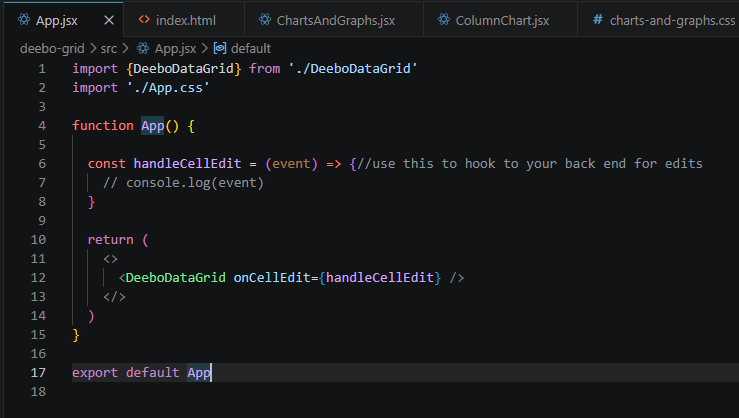
The default code above adds the <DeeboDataGrid /> component in line 12 to the
parent app component's jsx and runs essentially as a standalone ui. Find the component in your project where you want
to add the data grid. In that component, import the DeeboDataGrid component like in line 1 above and add it to your jsx.
This code will cause the data grid to appear in your component, and load the sample data set from an api request. When you're
ready, find the deebo-grid/src/services/GetDataService.js file, then update the const apiUrl variable with your rest api url. Use the React Docs menu to learn more about
the available features.
